Thursday, 27 March 2014

Infographic - The “World Of Programming”


What the Infographic Shows

Information graphics (or infographics) are used to display information in ways that are more creative than plain old text. These days, they surround us in the media, published works, road signs and manuals. Lately, the Internet has been flooded with infographics on various topics, ranging from science and technology to society and culture. In this article, we’ll look at the process of designing an infographic about programming.

This infographic exhibits pioneers in the field of programming, along with the history and current statistics of various programming languages. Also included are some random facts and algorithm diagrams to make the infographic more visually appealing. Click on the image to enlarge.


                                               Download Full Size :  Click Here


Wednesday, 26 March 2014

Draw a Bouncing Ball on Surface using C++ Graphics

Simple C++ graphics program that draws a Bouncing Ball over a Plain Surface. This program uses simple <graphics.h> functions to draw the ball. In this program , cos function is used to bounce the ball.  setfillstyle and floodfill functions are used to fill the ball.


Source Code
#include<dos.h>
#include<iostream.h>
#include<graphics.h>
#include<math.h>
#include<conio.h>
void main()
 {

   int d=DETECT,m;
   initgraph(&d,&m,"e:\tcc\bgi");
   float x=1,y=0.00000,j=.5,count=.1;
   float r=15;
   setcolor(14);
   line(0,215,650,215);
    sleep(1);
    for(int k=0;k<=7;k++)
     {

      for(float i=90;i<270;i+=10)
       {
 y=cos(((i*22/7)/180))/j;

 if(y>0)
 y=-y;
 x+=5;

 setcolor(14);
 setfillstyle(1,14);
 circle(x,y*100+200,r);
 floodfill(x,y*100+200,14);

       delay(100);

 setcolor(0);
 setfillstyle(1,0);
 circle(x,y*100+200,r);
 floodfill(x,y*100+200,0);

       }

      j+=count;
      count+=.1;

     }
   getch();
 }  

Output

You may also like:

-C++ Program To Implements Snake and Ladder Game ( Graphics )

- Quine - Print its own Source Code as Output

Again, Facebook buying Oculus VR for $2 billion


Actually, Facebook buying Oculus VR proves that giant companies are just like me: sometimes they get drunk and buy shit off the Internet.


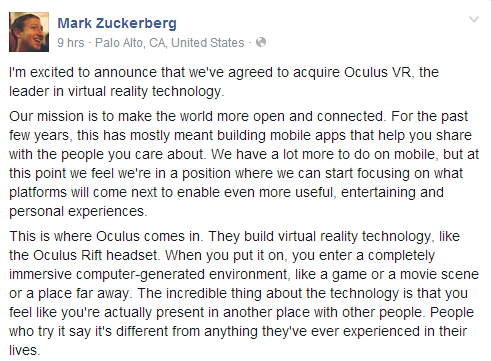
Facebook plans to purchase Oculus VR, maker of the Oculus Rift virtual reality headset, for $2 billion. The deal is comprised of $400 million in cash and 23.1 million shares of Facebook stock. Facebook announced its surprise purchase via a blog post. CEO Mark Zuckerberg has also revealed Facebook's reasons for the deal. "Oculus's mission is to enable you to experience the impossible. Their technology opens up the possibility of completely new kinds of experiences," Zuckerberg says. "Immersive gaming will be the first, and Oculus already has big plans here that won't be changing and we hope to accelerate."


Mark Zuckerberg Say that :


But the most interesting question, as Zuckerberg lays out, is where the technology will go in the future. "By feeling truly present, you can share unbounded spaces and experiences with the people in your life. Imagine sharing not just moments with your friends online, but entire experiences and adventures." Zuckerberg says that future is coming sooner than anyone thinks, and he "can't wait to start working with the whole team at Oculus to bring this future to the world, and to unlock new worlds for all of us."


Also Read:
Facebook Launches Hack Programming Language ~ Advanced Version Of PHP Language

Tuesday, 25 March 2014

Facebook Launches Hack Programming Language ~ Advanced Version Of PHP language

Finally, Facebook engineers Bryan O’Sullivan, Julien Verlaguet, and Alok Menghrajani spent the last few years building a programming language unlike any other.


Social networking site Facebook has brought out a new programming language, known as Hack. The name may confuse you but don't be baffled, as its a developmental tool. Some experts claim that Hack is a new version of PHP language, the one used by Mark Zuckerberg for developing Facebook.

Earlier, Facebook co-founder Zuckerberg used PHP to build the social network for nearly a decade. It is said that the need to develop this new language originated due to the heavy growth of Facebook. Since with PHP, the set up required large computer servers to run the site, as compared to other languages.

                                                     Benefits


"You edit a file and you reload a web page and you immediately get the feedback. You get both safety and speed," added O'Sullivan. Hack's benefits come without slowing down the developer, as can run without compiling.


However, the new language also runs on the Hip Hop Virtual Machine, but it allows coders and programmers the liberty to use both dynamic typing and static typing.


NOTE: If You Know Any New Things Feel Free To Comment.


Saturday, 22 March 2014

Algorithm For Quick Sort and Implement Quick Sort In C language

Quick sort is a very efficient sorting algorithm invented by C.A.R. Hoare. It has two phases:
  • the partition phase and
  • the sort phase


Quick sort
is the fastest internal sorting algorithm with the time complexity O (n log n). The basic algorithm to sort an array a[ ] of n elements can be described recursively as follows:

 Algorithm for Quick Sort


1. If n < = 1, then return.

2. Pick any element V in a[]. This is called the pivot.

3. Rearrange elements of the array by moving all elements xi > V right of V and all elements x­i < = V left of V. If the place of the V after re-arrangement is j, all elements with value less than V, appear in a[0], a[1] . . . . a[j - 1] and all those with value greater than V appear in a[j + 1] . . . . a[n - 1].

4. Apply quick sort recursively to a[0] . . . . a[j - 1] and to a[j + 1] . . . . a[n - 1].


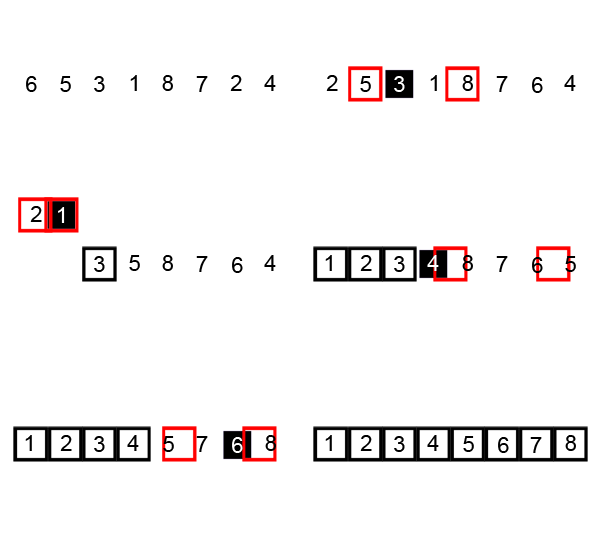
Visualization of the quicksort algorithm. The horizontal lines are pivot values.

Source Code
 #include <stdio.h>

void quick_sort(int[],int,int);
int partition(int[],int,int);

void main()
{
    int a[50],n,i;
    printf("How many elements?");
    scanf("%d",&n);
    printf("\nEnter array elements:");

    for(i=0;i<n;i++)
        scanf("%d",&a[i]);

    quick_sort(a,0,n-1);
    printf("\nArray after sorting:");

    for(i=0;i<n;i++)
        printf("%d ",a[i]);
}

void quick_sort(int a[],int l,int u)
{
    int j;
    if(l<u)
    {
        j=partition(a,l,u);
        quick_sort(a,l,j-1);
        quick_sort(a,j+1,u);
    }
}

int partition(int a[],int l,int u)
{
    int v,i,j,temp;
    v=a[l];
    i=l;
    j=u+1;

    do
    {
        do
            i++;
        while(a[i]<v&&i<=u);

        do
            j--;
        while(v<a[j]);

        if(i<j)
        {
            temp=a[i];
            a[i]=a[j];
            a[j]=temp;
        }
    }while(i<j);

    a[l]=a[j];
    a[j]=v;
    return(j);
}


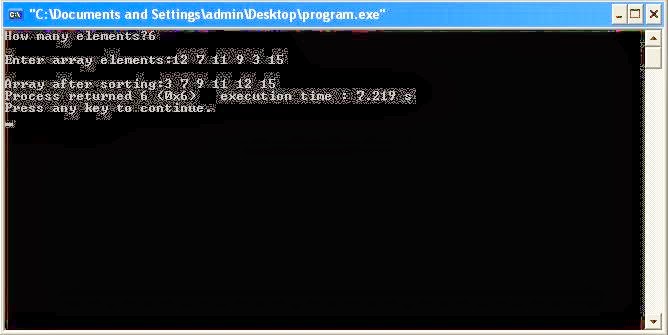
Output

Thursday, 20 March 2014

Simple Snake Game In C Language


Simple snake game written in C/SDL under linux, with Code::Blocks. The code can be compiled under windows without any problem. click "U" to speed up click "L" to speed down.

Source Code

 //**************************************
// Name: Simple Snake Game
// Description:Simple snake game written in C/SDL under linux, with Code::Blocks.
The code can be compiled under windows without any problem.
click "U" to speed up
click "L" to speed down
// By: Goundy
//

#include <stdlib.h>
#include <SDL/SDL.h>
#include <SDL/SDL_image.h>
#include <time.h>
#define N 500 /*snake max length*/
#define NODESIZE 10 /*node height & width*/
#define WINSIZE 400 /*window height & width*/
/********************************* types **************************************/
typedef enum {Up, Down, Right, Left}TDirection; /*possible direction type*/
/******************************************************************************/
/********************************* ecran **************************************/
SDL_Surface* screen = NULL; /*main screen*/
SDL_Surface* Table[N] = {NULL}; /*snake node table*/
SDL_Surface* blank; /*background (will be totaly wait)*/
SDL_Surface* puce; /*snake puce*/
/******************************************************************************/
/********************************* positions **********************************/
SDL_RectTabpos[N], /*snake node positions*/
ppuce; /*puce positions*/
/******************************************************************************/
/*********************************** other ***********************************/
int NodeCounter; /*snake node counter*/
TDirection direction; /*current direction*/
SDL_TimerID timer; /*timer descriptor*/
/******************************************************************************/
/************************* functions Prototypes ***************************/
Uint32 Anime_it (Uint32, void *);
int snakeColl(void);
void Quitter(void); // will be executed when exiting the game
void SetPos(void);
void MoveSnake (void);
void Show (void);
void PurgeScreen (void);
void SetPuce(void);
void Lose (void);
void freeNodes (void);
void AddNode(void); 


                               Download Full Source Code:   Click Here


Output


Also Read: Program To Find Whether A Number Is Prime Or Not
Also Read : Program to find factorial of Number in C++

Wednesday, 19 March 2014

C++ Program To Implements Snake and Ladder Game ( Graphics )

Hello everyone, Here we implements Snake and Ladder Game in C++ graphic.

A two player Snake and Ladder game in C++ Graphics :

Source Code
#include<stdio.h>
#include<graphics.h>
#include<conio.h>
#include<malloc.h>
#include<stdlib.h>
#include<dos.h>
#include<iostream.h>

int k=1, i, user=0, dice=0, x1=50, y1=410, x2=70, y2=410, dir1=0,
dir2=0,
ch;
int cnt1=1, cnt2=1;
void *obj1, *obj2, *o1, *o2, *dot, *back, *turn, *ready;
unsigned int size;

void ladder1()
{
    int m,n;
    for(m=0;m<=250;m+=250)
    for(n=0;n<=m;n+=250)
    {
        setcolor(DARKGRAY);
        line(53+m,57+n,55+m,55+n);
        line(53+m,57+n,133+m,137+n);
        line(55+m,55+n,135+m,135+n);
        line(133+m,137+n,135+m,135+n);
        setfillstyle(SOLID_FILL, YELLOW);
        floodfill(55+m,58+n,DARKGRAY);
        line(68+m,42+n,70+m,40+n);
        line(68+m,42+n,148+m,122+n);
        line(70+m,40+n,150+m,120+n);
        line(148+m,122+n,150+m,120+n);
        floodfill(70+m,43+n,DARKGRAY);
        line(65+m,65+n,78+m,52+n);
        line(68+m,68+n,81+m,55+n);
        floodfill(79+m,54+n,DARKGRAY);
        line(75+m,75+n,88+m,62+n);
        line(78+m,78+n,91+m,65+n);
        floodfill(89+m,64+n,DARKGRAY);
        line(85+m,85+n,98+m,72+n);
        line(88+m,88+n,101+m,75+n);
        floodfill(99+m,74+n,DARKGRAY);
        line(95+m,95+n,108+m,82+n);
        line(98+m,98+n,111+m,85+n);
        floodfill(109+m,84+n,DARKGRAY);
        line(105+m,105+n,118+m,92+n);
        line(108+m,108+n,121+m,95+n);
        floodfill(119+m,94+n,DARKGRAY);
        line(115+m,115+n,128+m,102+n);
        line(118+m,118+n,131+m,105+n);
        floodfill(129+m,104+n,DARKGRAY);
        line(125+m,125+n,138+m,112+n);
        line(128+m,128+n,141+m,115+n);
        floodfill(139+m,114+n,DARKGRAY);
    }
} 


                                 Download Full Source Code:   Click Here


Output

                                Also Read: Quine - Print its own Source Code as Output

NOTE: Please write comments if you find anything incorrect, or you want to share more information about the topic discussed above.

Tuesday, 18 March 2014

Quine - Print its own Source Code as Output

How Many Of You Know That You Can Also Print Your Source Code As An Output Using Quine.

What Is A Quine ??


A quine is a computer program which takes no input and produces a copy of its own source code as its only output. The standard terms for these programs in the computability theory and computer science literature are "self-replicating programs", "self-reproducing programs", and "self-copying programs".

Quine – A self-reproducing program


A quine is a program which prints a copy of its own as the only output. A quine takes no input. Quines are named after the American mathematician and logician Willard Van Orman Quine (1908–2000). The interesting thing is you are not allowed to use open and then print file of the program.

An example of a quine in C language is given below which produces the source code as an output.

To the best of our knowledge, below is the shortest quine in C.

Source Code
main()
{
    char *s="main() { char *s=%c%s%c; printf(s,34,s,34); }";
    printf(s,34,s,34);
}


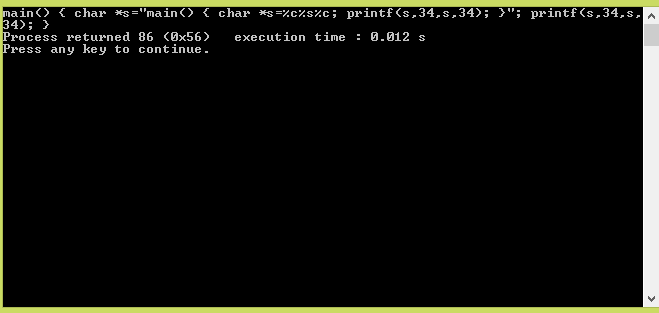
Output


This program uses the printf function without including its corresponding header (#include ), which can result in undefined behavior. Also, the return type declaration for main has been left off to reduce the length of the program. Two 34s are used to print double quotes around the string s.

NOTE: It can be written in any other language like java, python, etc.

And in Python:


s = 's = %r\nprint(s%%s)'
print(s%s)


And in Ruby:

eval s="print 'eval s=';p s"

If you find a shorter C quine or you want to share quine in other programming languages, then please do write in the comment section.

Wednesday, 26 February 2014

How to make an OpenGL/Glut Triangle


Triangle

  • Introductory program; just a static picture of a colored triangle.
  • Shows how to use GLUT.
  • Has minimal structure: only main() and a display callback.
  • Uses only the default viewing parameters (in fact, it never mentions viewing at all). This is an orthographic view volume with bounds of -1..1 in all three dimensions.
  • Draws only using glColor and glVertex withinglBegin and glEnd in the display callback.
  • Uses only the GL_POLYGON drawing mode.
  • Illustrates glClear and glFlush.
OpenGL 3 makes it easy to write complicated stuff, but at the expense that drawing a simple triangle is actually quite difficult.
Source Code
// A simple introductory program; its main window contains a static picture
// of a triangle, whose three vertices are red, green and blue.  The program
// illustrates viewing with default viewing parameters only.

Program: 

#include<GL/gl.h>
#include<GL/glu.h>
#include<GL/glut.h>

void display()
{
              glClear(GL_COLOR_BUFFER_BIT);
              glColor3f(1,0,0);
              
              GLfloat i;
              /*
              for(i=-0.8;i<=0.8;)
              {
                              glBegin(GL_LINES);
                              glVertex3f(0+i,-0.8,0);
                              glVertex3f(0+i,0.8,0); 
                              glEnd();
                              i+=0.2;
              }
              for(i=-0.8;i<=0.8;)
              {
                              glBegin(GL_LINES);
                              glVertex3f(-0.8,i,0);
                              glVertex3f(0.8,i,0); 
                              glEnd();
                              i+=0.2;
              }
              */
              
              for(i=-2;i<=2;i+=0.25)
              {
                        glBegin(GL_LINES);
                        glVertex3f(i,0,2);
                        glVertex3f(i,0,-2);
                        glVertex3f(2,0,i);
                        glVertex3f(-2,0,i);
                        glEnd();
              }
                                   
              
              glColor3f(1,0,1);
              glBegin(GL_TRIANGLE_STRIP);
              glVertex3f(0,2,0);
              glVertex3f(-1,0,1);
              glVertex3f(1,0,1);
              glColor3f(0,1,1);
              glVertex3f(0,0,-1);
              glColor3f(0,0,1);
              glVertex3f(0,2,0);
              glColor3f(0,1,0);
              glVertex3f(-1,0,1);
              glEnd();
              
              
              glFlush();
}

void init()
{
           glClearColor(0.1,0.3,0.8,1.0);
           glColor3f(1,1,1);
           glMatrixMode(GL_PROJECTION);
           glLoadIdentity();
           glFrustum(-2,2,-1.5,1.5,1,40);
           glMatrixMode(GL_MODELVIEW);
           glLoadIdentity();
           glTranslatef(0,0,-3);
           glRotatef(50,1,0,0);
           glRotatef(70,0,1,0);
}

int main()
{
          glutInitDisplayMode(GLUT_SINGLE|GLUT_RGB);
          glutInitWindowSize(500,500);
          glutInitWindowPosition(100,100);
          glutCreateWindow("Grid");
          
          glutDisplayFunc(display);
          init();
          glutMainLoop();
}  

Output

Java program to swap two numbers without using temp variable


Source Code

class Swapvariable

{

 public static void main(String s[])

 {

  int x,y;

  x=Integer.parseInt(s[0]);

  y=Integer.parseInt(s[1]);

  System.out.println("\nBefore Swap:\n"+"a="+x+"\tb="+y);

  x=x+y;

  y=x-y;

  x=x-y; 

  System.out.println("\nAfter Swap:\n"+"a="+x+"\tb="+y);

 }

}

Output


Tuesday, 25 February 2014

Program To Find Whether A Number Is Prime Or Not


What is a
PRIME NUMBER?


" A Natural number greater than 1 which has only two divisor 1 and itself is called prime number ".
For Example:  
5 is prime, because it has only two divisors 1 and itself.

Source Code
    #include<iostream>
    #include<conio.h>
    using namespace std;
            int main()
            {
             //clrscr();
             int number,count=0;
    cout<<"ENTER NUMBER TO CHECK IT IS PRIME OR NOT ";
              cin>>number;
               for(int a=1;a<=number;a++)
                   {
                    if(number%a==0)
                       {
                      count++;
                       }
                   }
           if(count==2)
             {
              cout<<" PRIME NUMBER \n";
             }
           else
             {
              cout<<" NOT A PRIME NUMBER \n";
             }
           //getch();
           }


Output


Program to find factorial of Number in C++


What is a Factorial of a number 'n'?


 The factorial of a number 'n' is the product of all number from 1 upto the number 'n' it is denoted by n!.  For example n=5 then factorial of 5 will be 1*2*3*4*5= 120. 5!= 120

Factorial program C++ Logic:

  • First think what is the factorial of a number? How mathematically it can be calculated.
  •  If you got this info then it will be very easier to make a C++ Program logic to find the factorial.
  •  User enters a number and we have to multiply all numbers upto entered number.
  • Like if user enters 6  then Factorial should be equal to factorial= 1*2*3*4*5*6.
  • In this case a for Loop will be very helpful. It will start from one and multiply all numbers upto entered number after it loop will be terminated.
  • Take a variable and initialized it to 1 and in loop store multiplication result into it like in below program a variable 
  • Factorial is used for this purpose.what is we does not initialized it to 1 and initialized it to zero or remain it uninitialized. In case of 0 our result will be zero in case of any number entered
  • In case of not initializing it our answer will correct mostly but if variable contains garbage value then we will not be able to get correct result. 
  • It is recommended that to initialize it to one.

Source Code

#include<iostream>

using namespace std;

int main()

{

    int num,factorial=1;

    cout<<" Enter Number To Find Its Factorial:  ";

    cin>>num;

    for(int a=1;a<=num;a++)

    {

        factorial=factorial*a;

    }

cout<<"Factorial of Given Number is ="<<factorial<<endl;

    return 0;

}

Output


Program to calculate sum and average of three numbers


Source Code

#include<iostream>
#include<conio.h>
using namespace std;

int main()
{
 //to clear the screen
float a,b,c,sum,av;
cout<<"Enter three numbers:";
cin>>a>>b>>c;


sum=a+b+c;
av=sum/3;
cout<<"\nSUM="<<sum;
cout<<"\nAverage="<<av;


getch(); //to stop the screen
}

Output


History Of C Language


Introduction
The C programming language was devised in the early 1970s by Dennis M. Ritchie an employee from Bell Labs (AT&T).


                                                                                            Wikipedia biography here

"He was the designer and original developer of the C programming language, and a central figure in the development of Unix. He spent much of his career at Bell Labs. He was awarded the Turing Award in 1983, and the National Medal of Technology in 1999".


Did You Know
  • C language is a structure oriented programming language, was developed at Bell Laboratories in 1972 by Dennis Ritchie
  • C language features were derived from earlier language called “B” (Basic Combined Programming Language – BCPL)
  • C language was invented for implementing UNIX operating system
  • In 1978, Dennis Ritchie and Brian Kernighan published the first edition  “The C Programming Language” and commonly known as K&R C
  • In 1983, the American National Standards Institute (ANSI) established a committee to provide a modern, comprehensive definition of C. The resulting definition, the ANSI standard, or “ANSI C”, was completed late 1988.
In the 1960s Ritchie worked, with several other employees of Bell Labs (AT&T), on a project called Multics. The goal of the project was to develop an operating system for a large computer that could be used by a thousand users. In 1969 AT&T (Bell Labs) withdrew from the project, because the project could not produce an economically useful system. So the employees of Bell Labs (AT&T) had to search for another project to work on (mainly Dennis M. Ritchie and Ken Thompson).

Besides assembler and Fortran, UNIX also had an interpreter for the programming language B. ( The B language is derived directly from Martin Richards BCPL). The language B was developed in 1969-70 by Ken Thompson. In the early days computer code was written in assembly code. To perform a specific task, you had to write many pages of code. A high-level language like B made it possible to write the same task in just a few lines of code. The language B was used for further development of the UNIX system. Because of the high-level of the B language, code could be produced much faster, then in assembly.

A drawback of the B language was that it did not know data-types. (Everything was expressed in machine words). Another functionality that the B language did not provide was the use of “structures”. The lag of these things formed the reason for Dennis M. Ritchie to develop the programming language C. So in 1971-73 Dennis M. Ritchie turned the B language into the C language, keeping most of the language B syntax while adding data-types and many other changes. The C language had a powerful mix of high-level functionality and the detailed features required to program an operating system. Therefore many of the UNIX components were eventually rewritten in C (the Unix kernel itself was rewritten in 1973 on a DEC PDP-11).

Features of C language
  • Reliability
  • Portability
  • Flexibility
  • Interactivity
  • Modularity
  • Efficiency and Effectiveness

C language is a structured language


At Last:


For years the book “The C Programming Language, 1st edition” was the standard on the language C. In 1983 a committee was formed by the American National Standards Institute (ANSI)
to develop a modern definition for the programming language C (ANSI X3J11). In 1988 they delivered the final standard definition ANSI C.

Program to calculate to average of three number


Source Code

/*C program to find the average of three numbers*/

#include<stdio.h>
int main()
{

float a,b,c,av=0;
 
printf("Enter any three numbers to find their average \n");//Enter 3 number
scanf("%f%f%f",&a,&b,&c);
 
av=(a+b+c)/3.0; //calculate average
 
printf("\n Average of three numbers is \t %f",av);//result store in variable av
return 0;
}

Output


Program to calculate area of a triangle


Formula of
Area of Triangle:


Area = ( s (s-a) (s-b) (s-c) ) ^ (1/2)
where s = (a+b+c) / 2
a , b and c are the Sides of Triangle.

Statement of C Program: Write a Program to Find the Area of a Triange , given the Three Sides of Triangle:
Source Code

#include<stdio.h>

#include<math.h>

int main()

{

float a,b,c,s=0,area=0;

printf("Enter the length of sides of triangle \n");

scanf("%f %f %f",&a,&b,&c);

s = (a+b+c)/2.0; /* s is semi-perimeter */

area = (sqrt)(s*(s-a)*(s-b)*(s-c));

printf("Area of triangle =\t %f",area);

return 0;

}

Output


Program to add two numbers


In this program, user is asked to enter two integers and this program will add these two integers and display it.

Source Code

#include<stdio.h>
int main()
{
int a,b,c;
printf("Enter first value="); // 1st number
scanf("%d", &a);
printf("Enter second value=n"); // 2nd number
scanf("%d", &b);
c=a+b; // Add
printf("sum=%d", c); // result store in c variable
return 0;
}

Output


Contact Us

Want to ask anything? Be our guest, give us a message.

Name Email * Message *